Now compatible · Realtrace RT600 Pro
Scan your cattle’s RFID tags. Put their records to work.
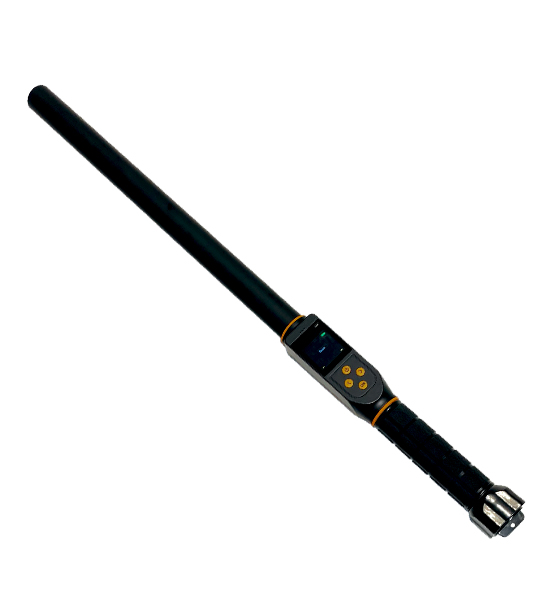
RanchBook now connects to the Realtrace RT600 Pro cattle wand on iPhone. Read a compatible U.S. 840 RFID ear tag, find the matching cow in Quick Entry, and record Wet, Dry, or Present without typing the tag number.
Direct Bluetooth scanning uses the compatible RanchBook iPhone app.
From ear tag to herd record
Realtrace RT600 Pro reads the electronic ID.
RanchBook matches the full tag number.
Tap Wet, Dry, or Present in Quick Entry.
The wand identifies the cow. You choose and save the status.
A cattle wand that connects to your herd records
When you are working cattle through the chute, typing a long electronic ID for every animal adds another step. With the Realtrace RT600 Pro connected to RanchBook, each valid scan fills the tag field and looks up the cow in your selected ranch.
Keep your familiar visual ear tag alongside the full RFID number in the cow’s record. Use Quick Entry for the day’s work, and use RanchBook’s herd records to keep tags, notes, photos, pastures, and cow history together.
Using U.S. 840 RFID cattle tags
An 840 animal identification number has 15 digits and begins with the U.S. country code, 840. For this workflow, use an electronic livestock tag compatible with the reader’s low-frequency ISO 11784/11785 FDX-B or HDX technology.
Before scanning, save the complete 15-digit number on the correct cow in RanchBook. The full electronic ID is what connects a scan to an existing record; a short visual tag number alone will not match it.
Check the tag’s technology as well as its number. An 840 prefix alone does not establish reader compatibility: a visual-only tag cannot be scanned, and UHF tags use a different radio technology.
How to connect the Realtrace RT600 Pro to RanchBook
- Prepare your herd records. Sign in to the compatible RanchBook iPhone app, select your ranch, and make sure each cow’s full RFID number is saved on its record.
- Set the wand to BLE mode. Turn on the RT600 Pro and choose Bluetooth BLE in the reader’s settings. If it was connected as a Bluetooth keyboard, disconnect that keyboard connection first.
- Connect in Quick Entry. Open Quick Entry, find the RFID wand panel, and tap Connect wand. Allow Bluetooth access and select your reader.
- Scan a cow’s RFID ear tag. Hold the reader near the tag. A valid scan fills the tag number and looks up the matching cow automatically.
- Record the result. Check the cow and tap Wet, Dry, or Present for the entry you want to save. Then move on to the next animal.
Keep Quick Entry open while you scan. Reconnect the wand when you return to the screen if the connection has ended.
Questions about RFID cattle management
Does the wand update a cow’s status automatically?
Scanning identifies the cow and loads it in Quick Entry. You still choose Wet, Dry, or Present and save the entry. This lets you check the animal before recording the work.
What if a scan does not find a cow?
Check that you selected the right ranch and saved the full electronic ID on that cow’s record. Compare all 15 digits with the number shown by the reader. If the same number is assigned to more than one cow, resolve the duplicate before continuing.
Can I connect the wand through the website or Android app?
The direct Realtrace Bluetooth connection described here is for the RanchBook iPhone app. You can also manage your herd in RanchBook on the web and Android; those platforms are separate from this iPhone wand connection.
Do I need a particular brand of 840 tag?
Check the tag specification for compatible low-frequency ISO 11784/11785 FDX-B or HDX technology. The 840 number identifies the numbering system, rather than a tag brand or radio technology. Confirm the exact tag and reader combination with your supplier.
Reader and tag references
- 4Tags: Realtrace RT600 Pro IP67 EID stick reader
- Realtrace: RT600BT Pro specifications and user manual
- USDA APHIS: official animal identification devices with the 840 prefix
For official animal identification and movement requirements, refer to USDA APHIS animal disease traceability guidance.